20 August 2026
Smart home planning
Practical smart home and home automation guidance covering budgets, app control, handover, planning, usability and honest engineering decisions.
20 August 2026
20 August 2026

20 August 2026
A practical guide to what a proper home automation system should include in a serious South African home, from lighting and audio to Wi-Fi, CCTV, power and support.
A plain-English explanation of how home automation works in a real South African home, from user commands to controllers, network, cabling and programmed scenes.
A practical answer to whether home automation is worth it in South Africa, with focus on reliability, daily use, power protection, security, resale value and good design.
A system that works while everything is already on may still fail after a full restart. Cold-start testing exposes power-up order and recovery issues.
A technically correct interface is not always the best interface. Smart home screens should sometimes be shaped around how the family actually uses the rooms.
The last part of a smart home project is where names, scenes, remotes, app layouts, testing and client behaviour are refined. It should not be rushed.
A practical look at how DG Technologies thinks through smart-home, Crestron, AV, CCTV and networking projects: judgement, documentation, simplicity and honest engineering.
A practical Durban and KZN guide to why a smart home quote should explain the engineering decisions behind the equipment list, including what to keep, replace, simplify or leave out.
The real test of a smart home is not how many features it has. It is whether the homeowner can use it confidently when the installer leaves.
Why a premium home may need the automation backbone installed early, even if only some circuits and rooms are automated on day one.
Infrared control may be old technology, but it teaches an important smart-home lesson: the client expects one button to do the obvious thing.
Remote support can solve problems quickly, but changes to networks, users, cameras, apps or automation should record who approved the action and why.
Good automation is not about automating everything. Sometimes the best design decision is choosing what should remain simple, manual or staged.
Boardroom AV drawings become useful when they reflect furniture, floor boxes, source routes, equipment positions and changes discovered during installation.
Training rooms and boardrooms may share technology, but their presenter position, viewing pattern, audio and content requirements are different.
A useful commercial AV site survey records the room, users, infrastructure, access, power, network and installation constraints before equipment is selected.
Late furniture changes, missing network access, untested cables, unclear source names and unavailable users can delay commercial AV commissioning.
A room-by-room equipment schedule makes a commercial AV project easier to quote, install, test and support.
Commercial AV equipment, programming and commissioning depend on one another. Procurement decisions should leave enough time and information for the system to be configured properly.
Commercial AV quotations should identify assumptions about access, cable routes, existing infrastructure, power and working hours before the project begins.
A first-person DG Technologies case study from Hawaan Forest Estate about coordinating speakers, control, Wi-Fi, television, satellite and equipment access during new-home construction.
A first-person DG Technologies account of how one Zimbali home's audio, internet, Wi-Fi, control and support requirements changed over more than a decade.
What a home automation installer should inspect during the first site visit before quoting a Durban or KZN smart home project.
Large homes need one accountable technology integrator to coordinate Wi-Fi, networking, CCTV, access control, audio, TV, lighting control, automation, racks and support.
After handover, small changes to room names, router settings, source devices and temporary repairs should be logged so the system remains understandable.
Premium AV projects depend on supplier stock, shipping and substitutions. Lead-time communication protects client expectations and project sequencing.
Electrical work can affect AV, CCTV, networking and automation systems. Testing afterwards catches tripped supplies, damaged cables and changed power conditions.
Photos are not just for marketing. In AV, CCTV, networking and automation support, they become evidence of what changed and why.
A support call moves faster when the fault is described by room, device, time and behaviour instead of only saying the system is not working.
Many CCTV and smart home complaints appear inside the client's phone. Testing the actual phone, app and connection can prevent the wrong system diagnosis.
When a client chooses not to include an option, recording that decision helps future support, upgrades and expectation management.
Gate and intercom systems often involve estates, homeowners, security companies, electricians and network providers. Responsibilities should be clear.
Before upgrading Wi-Fi, CCTV or smart home systems, the network cabinet should be audited. The cabinet often reveals the real cause of reliability problems.
After AV support, the client should test the system in normal use. Some intermittent faults only reveal themselves after real household routines resume.
Not every Wi-Fi complaint is caused by the access points. Device age, roaming behaviour, settings and usage patterns also need to be tested.
Multiroom audio should be enjoyable without becoming chaotic. Zone volume limits help protect speakers, neighbours, guests and the client's daily comfort.
Premium AV and automation faults should not bounce between suppliers. A clear escalation process protects the client and gets the right person involved faster.
Low-voltage cables are vulnerable during construction. Damage control, retesting and clear communication should be planned before finishes are complete.
Client-supplied TVs, speakers, projectors, routers and media devices can work well, but they need compatibility checks before installation day.
Smart home handover on move-in day is useful, but a follow-up training session after real use often reveals what the client actually needs.
Low-voltage conduits are planned for specific cables, bends and future access. Borrowing them for unrelated services can create avoidable AV support problems.
Holiday homes often sit unused, then suddenly need everything to work. CCTV, Wi-Fi, AV and automation should be checked before guests arrive.
Smart home projects depend on equipment availability, approvals, deposits and build sequencing. Procurement timing can affect design, labour and completion.
Large AV, CCTV and smart home quotations often evolve. Recording what changed and why protects the client, the project and the final system.
Remote support is faster when there is a clear authorised person who can approve changes, describe faults and confirm what is happening onsite.
Smart homes and AV systems need future access. Service panels should be planned with the architect and interior designer before finishes close.
Site decisions made during construction should not live only in WhatsApp messages and memory. They need to reach the final AV documentation.
Why physical keypads still matter in premium smart homes, especially when Wi-Fi, phones, guests or daily routines make app-only control frustrating.
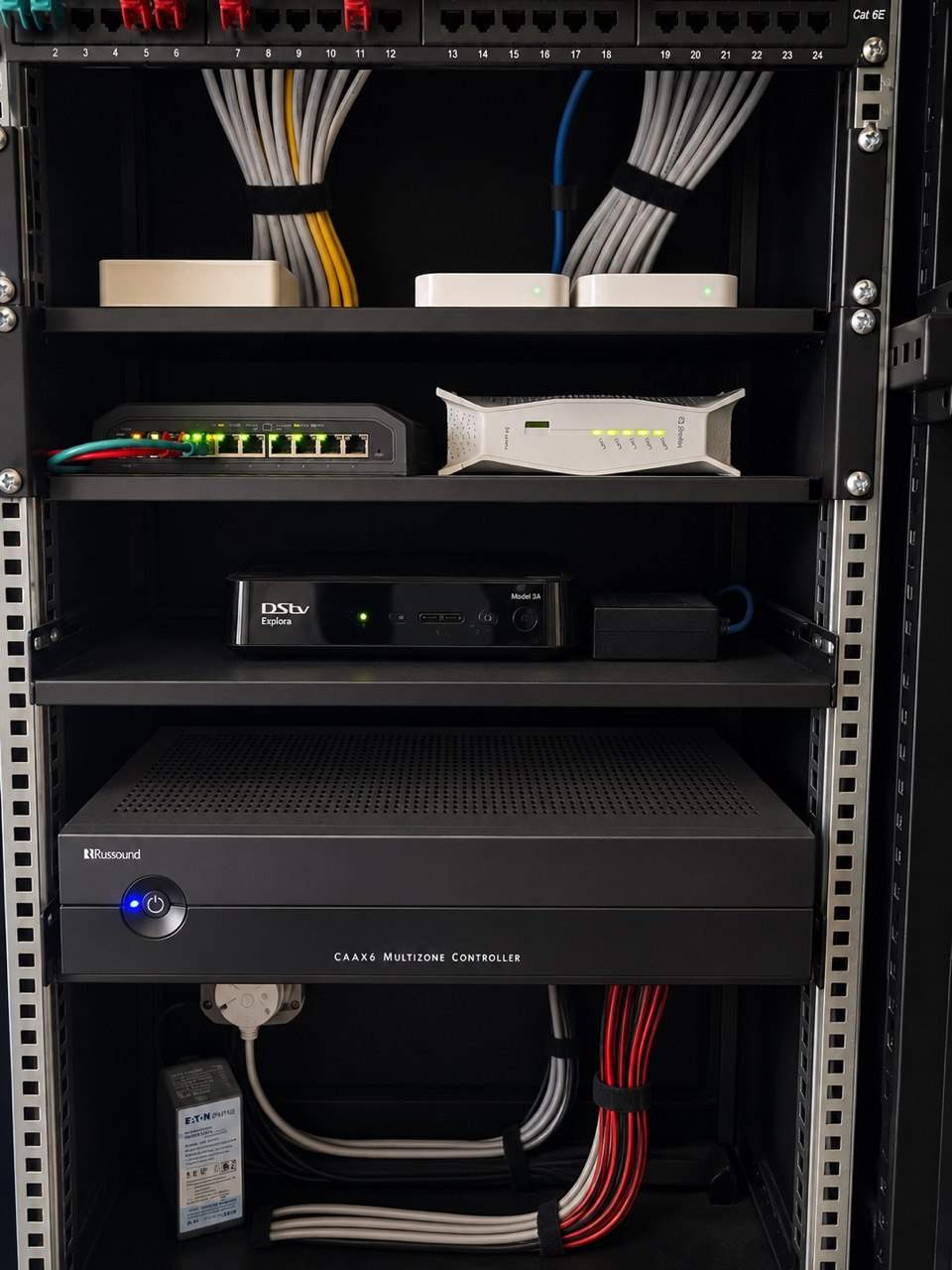
A rack is not just a neat cabinet. It gives residential AV, Wi-Fi, CCTV and smart home equipment power, airflow, structure and serviceability.
Room names, source names and device names in a smart-home app should match how the family, guests and staff actually refer to the home.
Premium homes often have critical routers, switches, processors and AV equipment in cupboards. Staff should know what must stay powered.
Before handover, important network, AV, CCTV and automation equipment should have a known firmware baseline so future changes can be understood.
A smart home installer needs to know which circuits are inverter-backed, which are grid-only and how the home should behave during load shedding.
Moving furniture after handover can affect AV cables, Wi-Fi, remotes, speakers, airflow and hidden technology in ways that are easy to miss.
Intermittent faults are easier to diagnose when clients record when they happened, what was being used and whether power, internet or heat may have been involved.
A clean AV rack is important, but tidying, dusting or repacking a cabinet can create faults if technical equipment is moved without understanding the system.
Photos help AV and smart-home support, but only if they show the screen, rack, power, labels and cable paths clearly enough to diagnose the problem.
Moving an Apple TV, decoder, streamer or media player can affect HDMI, control, networking, audio routing and user experience in a smart-home system.
When AV, CCTV, Wi-Fi or automation stops working, knowing which contractors or service providers visited recently can reveal the cause faster.
Labels in racks, cabinets and smart-home systems should help house managers, staff and support teams identify equipment without needing to understand the whole design.
AV and smart-home support works faster when the person on the phone can see the screen, rack, remote, app or device being discussed.
In AV, CCTV, Wi-Fi and smart-home support, the fastest route to the fault is often identifying what changed before the system stopped behaving normally.
Builder delays can affect AV, CCTV, Wi-Fi and smart-home pricing because installation work depends on access, sequencing, protection and repeat visits.
Before ceilings close, low-voltage cables should be checked for continuity, route confidence and obvious damage so hidden faults do not become expensive later.
Before demolition starts, AV, CCTV, Wi-Fi, speaker, fibre and control cables should be marked so useful routes are not destroyed by accident.
Builders, electricians, ceiling teams, cabinetmakers and AV installers should coordinate around low-voltage routes so cable paths are not blocked or damaged.
When power, circuits, sockets, containment and responsibility are unclear, AV and smart-home work can inherit electrical gaps that should have been resolved earlier.
Before extending a premium home, review whether the existing rack or head end can still serve new rooms, outdoor areas, cameras and Wi-Fi properly.
Old AV, CCTV, Wi-Fi, audio and automation devices hidden in ceilings, cupboards and joinery can change renovation scope and pricing.
When walls, ceilings, joinery, routes, equipment rooms or room usage changes, the AV and smart-home quotation should be reviewed before installation continues.
A working smart-home, AV, CCTV or network system can be damaged during renovation if cables, racks, dust and temporary power are not managed.
In premium homes, changes to CCTV, gates, Wi-Fi, smart-home apps and remote support should be approved by the right person, not handled casually.
Access control in premium homes should use clear names, permissions and expiry dates so old contractor and staff codes do not remain active forever.
House managers often need technology access, but permissions should be limited to the work they actually need to perform.
When a client gets a new phone, smart-home, CCTV, audio and access apps should be added carefully instead of rushed under pressure.
Equipment racks and network cabinets control critical home and business systems. Access should be managed, documented and limited to responsible people.
Remote support is useful, but premium homes need clear approval rules, responsible parties and records before installers connect from off site.
When house staff, managers or security personnel change, smart-home, CCTV, Wi-Fi and gate access should be reviewed.
Smart homes, offices and estates need clear support contacts for fibre, CCTV, automation, electrical, gates, security and AV so faults go to the right person first.
Private home support should have clear permission boundaries around rooms, equipment access, staff instructions and client decisions.
A smart home, CCTV and AV ownership pack helps a new buyer understand what technology exists, who supports it and what should be checked before transfer.
A new fibre router or ISP change can affect IP reservations, remote access, CCTV viewing and automation reliability if nobody controls the network handover.
Old app users, CCTV viewers, Wi-Fi credentials and remote-support accounts should be reviewed before they become an unnecessary security or privacy concern.
An annual technology review helps premium homes keep AV, CCTV, Wi-Fi, automation, power protection and documentation aligned with how the property has changed.
Why a home automation cost calculator or price list can mislead South African homeowners, and what actually affects the cost of a professional system.
Practical home automation ideas for luxury homes, focused on scenes, guest use, lighting, audio, Wi-Fi, security, power recovery and supportability.
How to setup home automation properly in a serious home: start with rooms, infrastructure, network, power, scenes, handover and support before buying devices.
Inherited systems expose whether an installer understands cabling, power, signal flow, control logic, documentation and client use beyond product knowledge.
A short handover video can capture how a smart-home, AV or CCTV system was intended to be used before details are forgotten.
Smart-home app favourites should reflect how the family uses the house, not how the installer thinks the system is organised technically.
AV snag lists are more useful when they separate true defects from preference changes, training issues, added scope and design refinements.
A cheaper product line may hide missing labour, support, cabling, testing, documentation or design work that another quote includes properly.
After years of supporting real homes, an installer learns to promise less casually, test more carefully and design systems that can actually be maintained.
Opening a gate from an app is useful, but premium homes also need reliable feedback showing whether the gate is open, closed or unknown.
Intercom calls in premium homes should be routed according to household roles, privacy and daily routines rather than ringing every phone at once.
Lighting scenes should be checked after furniture, artwork, curtains and daily room use are in place because the finished home changes how lighting feels.
In private homes, technical support is also a trust exercise. The way technicians enter, communicate and work matters as much as the repair.
A good maintenance report should help the client understand what was checked, what was fixed, what remains risky and what decisions need approval.
Network updates can affect Wi-Fi, cameras, intercoms, Crestron, streaming and remote access. Premium homes need agreed timing before work begins.
Crestron Home makes residential automation cleaner, but serious homes still need disciplined testing of rooms, scenes, networks, power recovery and user behaviour.
Network cabinets often look neat once joinery is finished, but routers, switches, PoE equipment and UPS units still need airflow and service access.
Managed networks need clear controller ownership so future support, monitoring, configuration and security decisions do not become confused.
A small, labelled spares box can prevent simple batteries, patch leads, adapters and remotes from becoming unnecessary emergency callouts.
Some AV and smart-home costs can only be confirmed after site conditions, final finishes, product selection or third-party work are known.
Large AV and smart-home projects involve owners, architects, builders, staff and managers. The quote process should make clear who can approve scope, changes and trade-offs.
Clear exclusions protect the client and installer by defining what is not included: electrical work, access equipment, builder work, third-party fees, apps or future changes.
Remote reboot outlets can be useful in smart homes and CCTV systems, but only when each outlet is labelled, documented and restricted to the right equipment.
After a room is renovated, AV, Wi-Fi, lighting scenes, remotes, speakers, cameras and control interfaces should be recommissioned for the new layout.
Old AV, CCTV, Wi-Fi and automation systems often reveal surprises during renovation, so budgets should allow for inspection, tracing and sensible decisions.
Network updates in integrated homes should have a rollback plan so CCTV, AV, Crestron, Wi-Fi and remote access can be restored if something behaves unexpectedly.
Large homes keep changing. Spare switch ports help future cameras, access points, TVs, touchscreens and control devices get added without messy shortcuts.
A device can test fine while the client's original problem remains. Good AV and smart-home support retests the exact user workflow that failed.
Premium homes need clear roles for the owner, house manager, IT provider, security company, electrician and smart-home integrator before daily use begins.
Construction Wi-Fi is useful for contractors, but the final home network should be designed, secured and commissioned separately for the occupied home.
Temporary access for contractors, IT providers, security teams or maintenance companies should be removed once the work is complete.
The fibre ONT, router and switches should be treated as one network chain, especially where CCTV, Crestron, Wi-Fi and remote support depend on them.
Wi-Fi access-point placement can look correct before move-in, but real roaming should be checked once doors, furniture, glass and daily routes are in place.
Firmware updates and network changes can affect AV, CCTV, Wi-Fi and automation systems. They should be handled during a planned maintenance window.
Automation should make life easier, not trap the homeowner. Good smart home design includes manual fallback options for important functions.
In large homes, the router is only one part of the network. Switch placement, cable routes, cabinet planning and access point layout often matter more.
When a business cannot afford downtime, CCTV, Wi-Fi, network and PA cutovers need staged planning, extra labour, testing and rollback thinking.
Router ownership, admin access and IP reservations affect CCTV, Wi-Fi, automation, AV control and remote support in serious home technology systems.
Small scheduled maintenance visits usually cost less than urgent AV, CCTV, network or smart-home failures after the system has already gone down.
A practical first-fix guide for boardroom AV: camera positions, microphones, speakers, display walls, table boxes, cabling, rack space and power.
Older multiroom audio systems reveal why every room does not always need to be independent, and why grouping should follow how the home is actually used.
Older router setups show why IP reservations, port rules, Wi-Fi names, DHCP ranges and network ownership matter in modern home automation.
Years of AV, CCTV, networking and automation work help an installer recognise risk earlier: cable access, power, heat, client habits, contractors and missing documentation.
A smart-home or AV fault often makes more sense when the installer understands the timeline of previous upgrades, router changes, source changes and repairs.
A long-term support record helps identify recurring faults, changes by other trades, power issues and equipment patterns that a once-off callout may miss.
A private home's technology improves when the installer remembers past decisions, past faults, client preferences and the reasons behind previous upgrades.
Early private-home AV work teaches that the client’s frustration, habits and expectations often explain the system better than the equipment list does.
Stone, timber, wallpaper, custom ceilings and detailed joinery raise the stakes for AV, Wi-Fi, CCTV and smart-home planning because mistakes become costly to repair.
Private-home support improves when the installer remembers how the client likes to use rooms, remotes, music, cameras, apps and staff access.
A missing conduit is not a small oversight on a finished home. It can change the installation method, labour cost, finish risk and final result.
UPS units protect racks, networks, CCTV and automation systems only if their batteries are healthy. Battery replacement should be planned, not guessed.
A rack room or equipment cupboard needs light, space and access. Maintenance becomes harder when the technology area is treated as leftover space.
A good AV and smart home handover should explain what the client can restart safely and what should be left to the support team.
Large homes and commercial sites change constantly during construction. A low-voltage change log keeps AV, CCTV, network and automation decisions traceable.
Technology installation costs are affected by access, working hours, security rules, lifts, parking and whether the site is live or still under construction.
A documented Durban residential project shows why large smart homes depend on lighting records, commissioning and a calm user experience, not only expensive equipment.
Photographing cable routes, conduits, speaker positions and access points before ceilings close can make future maintenance and upgrades much easier.
Construction dust can damage AV, network and smart home equipment. Timing, protection and commissioning discipline matter on active building sites.
Exterior lighting should not be a mix of timers, sensors and app buttons nobody understands. Good logic keeps garden and pathway lighting predictable.
Most low-voltage problems are easier to prevent before pipework starts. A short coordination meeting can save days of site pressure later.
Premium AV, CCTV and smart home systems should be handed over with equipment records, serial numbers and warranty information that can be used later.
Large homes, estates and commercial sites often need reliable links between buildings. Fibre should be considered early, not after Wi-Fi bridges struggle.
Geyser automation can be useful, but it needs correct electrical design, load control, labelling, override logic and clear ownership.
Outdoor automation is not just another lighting circuit. Pool lights, pumps and exterior loads need electrical coordination, protection and clear control logic.
Every extra lighting, pool, garden or utility load needs real control capacity. Relay planning prevents late-stage surprises and rushed compromises.
Good Wi-Fi support becomes easier when access points are named according to real rooms, floors and building areas rather than vague technical labels.
Many older Crestron homes can be upgraded carefully, but the right answer depends on wiring, lighting modules, processors, touchscreens, audio, network and how the family uses the home.
A practical maintenance checklist for Crestron, AV, Wi-Fi, CCTV and lighting systems in occupied luxury homes.
A redacted DG Technologies reflection on years of joint electrical, AV, automation, cabling and site-coordination work across demanding KZN homes and commercial projects.
Buying a luxury home with an existing Crestron system? Here are the questions to ask before you inherit the automation, lighting, AV and network.
Buying a home with existing smart home technology? Check the network, CCTV, audio, lighting, passwords, documentation and support before you inherit the system.
Crestron lighting faults should be diagnosed from the load, keypad, module, power supply, wiring, programming and network before parts are replaced.
Crestron touchscreens, apps and audio controls can feel slow when the underlying network, router, switching or IP addressing has not been managed properly.
Before renovating a smart home, inspect the existing AV, Wi-Fi, CCTV, audio, lighting and cable routes so useful infrastructure is not destroyed or duplicated.
Smart-home drawings are not only for the client. Builders, electricians, cabinet makers and AV teams all need clear low-voltage route markups before work starts.
Crestron source files, drawings, labels and system documentation protect the homeowner from lock-in, guesswork and expensive support years later.
Why adding extra lights, iPad controls, relays or Crestron functions is not always only programming; the physical panel and spare capacity matter.
Older Crestron homes often depend on iPads, Apple TVs, decoders, amplifiers and source devices that changed over time. Support must diagnose the full chain.
Smart-home handover should not collide with guests arriving, incomplete rooms and last-minute snags. Move-in week needs a technical readiness buffer.
A practical KZN smart-home and AV planning article on why plastering, skimming and ceiling closure should wait until key low-voltage routes are confirmed.
Moving decoders, amplifiers, routers or source devices into a new cabinet only works if power, ventilation and cabling are ready first.
Smart home handover should include account ownership, passwords, app access, router credentials, CCTV users, remote support and secure removal of old users.
Temporary smart home fixes can be useful during renovations, fibre changes or phased upgrades, but they need documentation and a permanent plan.
A TV can be technically mounted and still feel wrong. Screen height, cabinet space, decoders, amplifiers, remotes and cable access must be planned as one detail.
A field-based explanation of how a single faulty relay, power supply or control device can create wider symptoms in a Crestron or smart-home system.
Motion sensors can make exterior and passage lighting easier, but premium homes still need clear manual override behaviour so the system respects real life.
Motorised TV brackets can be impressive, but they need structure, cable movement, control logic, safety and service access to be reliable.
A note from DG Technologies on the people behind reliable projects, from specialist suppliers to trusted businesses doing serious work in their own fields.
Some imported amplifiers, AV receivers and source devices are not built for South African power. One wrong plug-in can destroy good equipment.
Why old Crestron systems should be inspected, documented and tested before a homeowner commits to a full replacement.
A practical guide to choosing the right Crestron approach for a residential project, and why the most expensive system is not always the best engineered system.
Why premium homes in Durban, Umhlanga, Mount Edgecombe, Zimbali and Simbithi need proper network design before CCTV, audio, smart-home control and streaming can work reliably.
An AV rack built into a bar, cabinet or feature wall can look exceptional, but it needs ventilation, cable access, service clearance and power planning.
A practical Durban and KZN guide to understanding cheap smart home, CCTV, Wi-Fi and AV quotes, and why the right system is usually the one designed for long-term reliability.
Equipment delays do not have to stop a premium AV project. A good team can use that time to prepare racks, cable routes, labels, drawings and site readiness.
When a premium home suddenly has no sound, no TV signal or no music during a busy weekend, the fastest diagnosis often starts by finding what changed.
Rack photos, labels and handover records help future support teams understand AV, networking, CCTV and automation systems without guesswork.
Smart-home app room names, source labels and scenes should use the language of the household, not installer shorthand or equipment names.
Firmware updates can improve systems, but unmanaged updates can also break AV, Wi-Fi, CCTV and automation. Premium homes need a controlled update process.
Premium AV and automation projects depend on the right equipment arriving at the right stage. Stock planning protects timelines, budgets and finish quality.
DG Technologies explains the next level of home automation research: AI-assisted homes that can investigate, reason and act from real system data.
Premium AV and smart-home systems should be designed around how the home is cleaned, handled and used every day, not only how it works during handover.
Gate motors, intercoms, CCTV, access control, Wi-Fi and Crestron control should be planned together so estate homes stay secure and easy to manage.
Choosing the best home automation installer in KZN is not only about brand names. It is about reliability, judgement, client fit, infrastructure and long-term support.
Smart home automation can improve resale value, but only when the system is reliable, documented, serviceable and simple for the next owner to use.
A practical South African guide to smart home, home automation, lighting control, Crestron Home, AV, CCTV, Wi-Fi and related terminology.
Large private homes need a simple operational checklist for Wi-Fi, CCTV, gates, AV, lighting scenes, remotes, rack power and support reporting.
A proper smart-home support contract should cover networks, CCTV, AV, automation, firmware, documentation, remote support and scheduled checks.
Why professional smart home and Crestron installations need proper router management, IP reservations, network control and secure remote access.
The best savings in a smart-home quotation usually come from better decisions, not cheaper products.
A smart-home rack is not just a cupboard for equipment. Heat, airflow and access can decide whether the system remains reliable.
In South Africa, a premium smart home must recover cleanly after outages, inverter changeovers and network restarts. That needs deliberate planning.
A reliable AV system depends on planning sources, HDMI paths, audio routing, control, rack layout and future devices before equipment is installed.
A smart home is not only the equipment installed on day one. It should be designed so it can be maintained, repaired and understood years later.
A trustworthy smart home quote should explain where money is worth spending and where equipment would add cost without improving the home.
A practical guide to planning smart home automation, Wi-Fi, CCTV and AV infrastructure for premium homes in Zimbali and the KZN North Coast.
One-touch smart-home control only works properly when the lighting, network, audio, cabling and programming underneath are reliable.
A solar or inverter system keeps the house running, but sensitive smart home, network and CCTV equipment still benefits from clean rack-level UPS protection.
A premium smart home should be reviewed before small issues become disruptive. A maintenance calendar keeps systems current and supportable.
Remote support and remote viewing are valuable, but they must be planned with security, ownership and long-term support in mind.
Many smart-home faults look like app, camera, audio or automation problems, but the first place to check is often the network underneath.
A proper smart-home quotation should help the client make decisions. Options, priorities and explanations are often more valuable than one rigid equipment list.
In private homes, the owner is not always the only person using the system. Staff and house managers need simple, controlled handover.
How interior designers can help protect premium finishes by coordinating TVs, speakers, keypads, touch panels, cameras, access points, racks and joinery before AV installation.
A good lighting-control system is designed from the electrical circuits and loads first. The keypad is only the part the client sees.
Why premium residential projects should separate specialist AV, networking, CCTV, lighting control and smart home scope from general electrical work.
The AV and smart-home team should be involved before first fix so conduit, power, rack space, Wi-Fi, CCTV and control points are planned properly.
Crestron DM NAX streaming amplifiers reduce external streamers, simplify source routing and make modern Crestron Home multiroom audio more reliable.
When a smart home project is outside the normal support area, the design has to remove guesswork before anyone travels, ships equipment or closes ceilings.
Premium homes need a simple pre-event AV checklist so music, TV, Wi-Fi, remotes and cinema rooms work before guests walk in.
What homeowners should expect from a professional smart-home, Crestron, AV, CCTV, Wi-Fi or lighting-control rescue report before repairs begin.
A practical architect briefing guide for premium residential smart home, AV, Wi-Fi, CCTV, lighting control and infrastructure planning before design decisions become fixed.
A smart home consultation should uncover how the home is used before equipment is specified. Here is what homeowners should expect from a proper first conversation.
The cheapest time to make a smart-home decision is usually before ceilings close. Good prewire planning protects the budget later.
A practical decision guide for KZN homeowners with unreliable legacy Crestron systems: when to repair, recommission, upgrade or replace.
A premium smart home should not depend on scattered project information and one person's memory. It needs a clear technical record.
Planning advice for Simbithi homes covering Wi-Fi, CCTV, access control, lighting, audio, guest use and future serviceability.
How homeowners and project teams in Mount Edgecombe, Zimbali, Simbithi, Umhlanga and KZN secure estates should plan automation, CCTV, Wi-Fi, AV and contractor coordination.
A practical planning guide for very large Durban and KZN homes where automation, networking, lighting, CCTV, AV and support must be designed as one infrastructure system.
A practical smart-home, AV, lighting, CCTV and networking brief template for architects, homeowners and project managers planning premium KZN homes.
A practical DG Technologies reference for architects and builders planning Wi-Fi access points, TV points, dish, fibre, CCTV, speakers, conduit, draw boxes and head-end routes before first fix.
A technical but practical guide to inherited Crestron and smart home problems in Mount Edgecombe Estate homes, and how DG Technologies approaches rescue work.
Why large homes in Durban, Mount Edgecombe, Zimbali, Simbithi and the KZN coast need Crestron Home designed around infrastructure, not gadgets.
A practical guide to deciding where Crestron Home touchscreens are worth installing, and where app, keypad or remote control may be the better value.
Crestron lighting control should be designed around circuits, LED compatibility and real room use, not simply by dimming every light in the home.
Large private homes need smart-home systems designed for more than the owner, including house managers, staff, guests and support teams.
A properly designed smart-home rack should be easy to service, document, cool, expand and understand long after the original installation team has left site.
Before a smart home becomes touch screens, cameras, Wi-Fi, audio and lighting scenes, it starts with conduit, cable routes, junction boxes and coordination with the builder and electrician.
The equipment rack is often hidden from view, but it says a lot about how a smart home was designed, installed, documented and prepared for support.
Smart lighting design is not about dimming everything. In modern homes, the better engineering decision is often choosing which circuits need dimming and which should use relays.
Why a staged smart-home upgrade can protect budget, reduce waste and improve reliability when an existing system still has useful equipment.
Why premium KZN homes need a written technology brief before an AV, home automation, lighting, security, Wi-Fi or multiroom audio quote can be designed properly.
A premium smart home should be maintained after handover. DG Technologies explains why networks, CCTV, lighting, audio and automation need ongoing support.
Why reliable Wi-Fi in premium KZN homes depends on professional network design, not just stronger signal bars or cheap extenders.
In private luxury homes, technology should protect privacy, reduce visual noise and support the lifestyle without drawing attention to itself.
Smart-home platforms, apps and devices change quickly, but good cabling, documentation, supportability and design judgement remain valuable for years.
Premium smart lighting is not about filling a home with smart bulbs. It is about well-designed lighting scenes, reliable control, correct LED compatibility and practical room-by-room use.
Luxury home automation should reduce friction, visual clutter and daily decisions. DG Technologies explains why calm control, reliable scenes and discreet design matter in premium KZN homes.
Why multiroom audio design should be based on lifestyle, room flow, entertainment habits and supportability, not simply on creating as many zones as possible.
The best home automation systems are not designed around technology first. They are designed around the people, routines and decisions inside the home.
A smart home should not only work for the owner. It should make daily life simple for family, guests, staff and trusted visitors without weakening privacy or security.
A practical guide for KZN architects, builders, project managers and premium homeowners on why conduit, speakers, Wi-Fi, CCTV, keypads, racks and service access should be coordinated before ceilings and finishes close.
Crestron Home can be a practical, maintainable platform for premium KZN homes when the design is based on how the family actually lives.
A practical Durban and KZN view on why Crestron Home is often the right-sized automation platform for luxury residential homes that need reliable control, maintainable setup and easier long-term support.
Before replacing a legacy Crestron system, DG Technologies explains why the original design, wiring, loads, rooms and user expectations must be understood first.
A practical look at how DG Technologies assesses existing smart-home, AV, CCTV, Wi-Fi and Crestron systems before recommending what should stay, what should go and why.
A practical guide for KZN architects, builders, interior designers and project teams on what to coordinate before smart-home prewiring, plaster, ceilings and final finishes.
A practical guide to why smart homes can become unreliable over time, from networks and lighting loads to undocumented racks and ageing equipment.
A practical look at how DG Technologies assesses unreliable Crestron, lighting, audio, Wi-Fi, CCTV and AV systems before recommending repairs or upgrades.
A practical checklist for KZN estate homeowners choosing a home automation, Crestron, CCTV, Wi-Fi or AV company for a private residence.
Why DG Technologies often uses Ubiquiti UniFi for large KZN homes that need reliable Wi-Fi, managed networking and practical remote support.
A smart home is not finished when the equipment is installed. Proper support starts with documentation, reliable design and someone who understands the system later.
A practical guide for Mount Edgecombe homeowners with unreliable legacy Crestron systems, including common faults, repair options and when to upgrade.
A practical 2026 guide to why DG Technologies specifies Crestron Home for serious residential automation projects in South Africa.
A practical guide to why Android users planning a serious South African smart home should look at the Crestron Home app and Crestron Home system.
A practical South African guide to the Crestron Home app and why the system behind the app matters more than screenshots.
What premium estate homes in Zimbali, Simbithi, Mount Edgecombe and Umhlanga should expect from a properly integrated smart-home system.
A practical South African guide to why Crestron Home is still one of the strongest platforms for serious home automation projects.
A practical guide to why DG Technologies focuses on Crestron Home for serious residential automation projects in South Africa.
What South African homeowners can realistically expect from R50k, R150k and R500k+ home automation budgets.
A practical checklist for planning cabling, conduit, Wi-Fi, speakers and equipment space before construction closes up.
A plain-English explanation of the difference between consumer smart-home products and professionally integrated home automation.
Why structured cabling, Wi-Fi planning and rack space need to be decided early on smart-home and hospitality projects.
From infrastructure recovery to complex automation, we solve the deep technical problems.