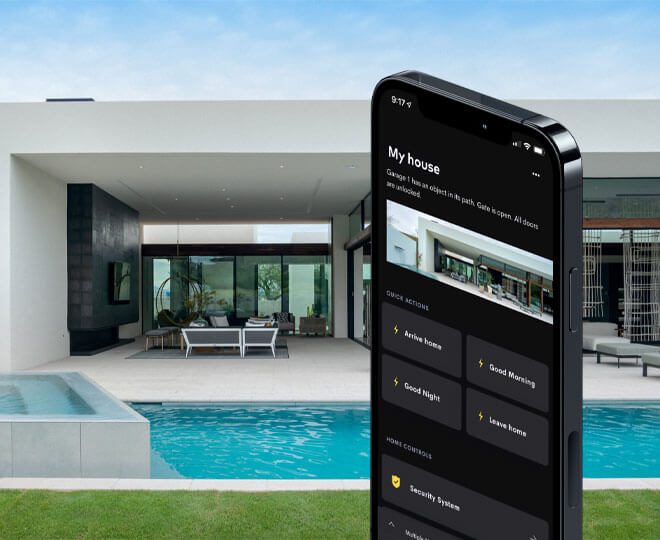
For Android users searching for the best home automation app, DG Technologies’ answer for a serious smart home is Crestron Home.
The reason is simple: the app is backed by a professional automation platform. The Crestron Home app on Google Play is described as giving Android users control of lighting, climate, audio, video, shades, security and more. Crestron’s own Home documentation also explains that the Crestron Home app provides a consistent look and feel across Crestron touch screens, Apple iOS devices and Android devices.
That matters in a South African home because the client experience should not depend on one phone, one brand of handset or one person in the family. A proper home should be usable from wall controls, touch screens, remotes and mobile devices.
Android control should not mean phone-only control
The biggest mistake with smart-home apps is making the phone the entire system. Phones are useful, but they are not always in your hand. They run flat, get left upstairs, update at inconvenient times or sit on a charger while someone else needs to control the room.
Crestron Home solves this properly because Android app control is only one part of the wider control system. The same home can also use touch screens, keypads and remote controls. That gives the client flexibility without making the house dependent on a single device.
In practice, that means:
- A wall keypad can trigger a lighting scene.
- A touch screen can control rooms, music and climate.
- A remote can run the cinema or media room.
- The Android app can control the home from a phone.
That is a much better model for premium homes than relying on a folder full of unrelated apps.
Why Crestron Home is a good Android choice
Crestron Home is a good Android choice because it is designed for integrated systems. It can bring together the parts of the home that matter every day: lighting control, audio, video, climate, shading, security, cameras and room scenes.
For a homeowner, the value is not technical complexity. The value is simplicity. The home should behave predictably:
- Arrive home and selected lights, climate and audio are ready.
- Start a movie and the room prepares itself.
- Open entertainment areas without manually setting every zone.
- Use Goodnight or Away scenes to simplify the end of the day.
The Android app becomes the control surface for a properly designed environment.
Official Crestron Home Android resources
For clients who want to see the app and how it works, start with Crestron’s official resources:
- Crestron Home on Google Play
- Crestron Home app documentation
- Crestron Home overview
- Crestron Home tutorial videos
Those links are useful because they show that Crestron Home is not a generic smart-home app. It is part of a professional residential control platform.
What Android users should plan before installation
Before choosing any automation system, Android users should think about the home itself. The right app will not fix poor infrastructure. A serious automation project needs proper cabling, rack design, Wi-Fi, network switching, power protection and service access.
For homes in Durban, Umhlanga, Mount Edgecombe Estate, Simbithi and Zimbali, we also consider coastal conditions, outdoor areas, long cable routes, large entertainment zones and power stability. If the network is weak, every app feels weak. If the system is planned properly, the app feels natural.
That is why DG Technologies starts with design. We look at the rooms, lighting circuits, speaker routes, TV positions, camera points, access control, Wi-Fi coverage and equipment rack before treating the app as the solution.
The best Android app for a serious smart home
For a small DIY setup, many apps can switch a few devices on and off. But for a proper South African smart home, the Android app should be part of a professional control system.
That is where Crestron Home makes sense. It gives Android users mobile control while still supporting the fixed controls and infrastructure a serious home needs.
If you are planning a new build or renovation, the right time to design the Crestron Home system is before the walls close. That gives the project room for proper cabling, keypad positions, touch screens, speakers, cameras, access points and rack space.
DG Technologies designs home automation systems around the way the property will actually be used. For Android users who want a premium, integrated home, Crestron Home is the platform we would build around.
