Most Wi-Fi complaints start with the same sentence.
“But I have full bars.”
That is understandable. Phones and laptops have trained people to judge Wi-Fi by the little signal icon in the corner of the screen. If there are three or four bars, the assumption is that the Wi-Fi should be good. If there is one bar, the assumption is that the Wi-Fi is bad.
In small homes, that simple view may be close enough. In larger premium homes across Umhlanga, Mount Edgecombe, Zimbali, Simbithi and the KZN North Coast, it is not enough.
Signal bars only tell part of the story. They do not tell you whether the access point is overloaded. They do not tell you whether the device is connected to the correct access point. They do not tell you whether the access point has a proper wired connection back to the network. They do not tell you whether the network has been designed for roaming, guest access, CCTV, smart-home control, outdoor areas, power backup or future support.
Premium Wi-Fi is not about making the signal icon look better.
It is about designing the home network so the technology feels stable in real use.
That is why DG Technologies treats wireless distribution as part of the wider networking infrastructure, not as a quick router upgrade or a box of extenders.
Signal strength is only one measurement
A strong signal can still give a poor experience.
The phone may show full bars because it can hear the access point clearly. That does not mean the access point can serve every device well. It also does not mean the access point has clean capacity back to the internet, the network switch, the camera recorder, the Crestron processor, the audio streamers or the rest of the home.
Wi-Fi has to deal with more than distance. It has to deal with walls, slabs, glass, metal, cabinetry, neighbouring networks, device density, channel interference, outdoor spaces, roaming behaviour and the quality of the wired network behind the access points.
In upmarket KZN homes, this becomes obvious very quickly. A large residence may have concrete construction, split levels, thick walls, double-volume spaces, entertainment patios, guest suites, staff areas, garages, gatehouses and outdoor living zones. One signal number cannot describe that property properly.
The better question is not, “How many bars do I have?”
The better question is, “Is the right device connected to the right access point, over the right channel, with a clean path back to the network, and enough capacity for what the family is doing?”
That is the difference between Wi-Fi coverage and Wi-Fi design.
Access point placement is an engineering decision
Professional Wi-Fi starts with placement.
Access points should not be installed wherever there happens to be a plug point, a convenient ceiling void or a cupboard with space. They should be positioned around how the building is built and how the home is used.
Bedrooms need reliable coverage without blasting unnecessary signal through the whole house. Home offices need stable video calls and low frustration during working hours. Entertainment areas need enough capacity for streaming, guests and mobile devices. Patios and pool areas often need planned outdoor coverage, not whatever leaks through the nearest sliding door. Gatehouses, garages and staff quarters may need their own network path instead of depending on a weak signal from the main house.
Too few access points create dead spots. Too many badly placed access points can also create problems. If access points overlap poorly, devices may hold onto the wrong one. If the transmit power is too high, the phone may hear an access point from far away but struggle to speak back to it properly. If the channels are not considered, access points can interfere with each other.
Good placement is therefore not just about filling a floor plan with circles.
It is about making the Wi-Fi behave naturally as people move through the home.
Cabling and backhaul make the Wi-Fi real
The access point on the ceiling is only the visible end of the system.
Behind it should be a proper cable route back to a switch or rack. That wired backhaul is what allows each access point to perform properly. Without it, the system often becomes a chain of compromises.
This is where cheap extenders fall short in larger homes. An extender may repeat the wireless signal into another room, but it usually depends on the quality of the signal it receives. If it is repeating a weak, noisy or congested signal, it may improve the bars without improving the actual experience. In some cases, it adds more complexity and more points of failure.
Wired access points are different. Each access point has its own clean network connection back to the infrastructure. The switch powers the access point where PoE is used. The rack becomes the central place where the network can be managed, labelled, protected and supported.
For new builds and renovations, this is why cabling needs to be discussed before ceilings close and finishes go in. A beautiful finished home is much harder to correct later if no one allowed for proper access point cabling, outdoor data points, camera points, TV points, rack space and conduit routes.
We have written about this in more detail in Large KZN homes need a network backbone, not just Wi-Fi. The short version is simple: Wi-Fi is only as good as the network underneath it.
Roaming matters more than people realise
In a large home, a device should move from one access point to another without the family thinking about it.
That sounds simple, but roaming is one of the areas where poor Wi-Fi design becomes frustrating. A phone may stay connected to the access point in the bedroom while the person has already walked to the patio. The signal bars may still show something, but the connection feels slow or unstable because the device is holding onto the wrong access point.
Professional network design cannot force every client device to behave perfectly, because phones, tablets and laptops make some of their own roaming decisions. But the network can be designed to help them make better decisions.
That includes sensible access point placement, suitable transmit power, clean channel planning, consistent network names where appropriate, and controller-managed configuration in a UniFi-style environment.
This is one of the practical reasons DG Technologies prefers managed network systems for serious homes. The value is not a logo on the access point. The value is that the network can be designed, configured, monitored and adjusted as a system.
For a family, good roaming feels boring in the best way. Video calls keep going. Music keeps playing. Camera apps load. The home automation app works from the bedroom, the kitchen and the patio without anyone needing to toggle Wi-Fi off and on.
Guest networks and VLANs protect the home
Premium homes often have a lot more connected devices than the owner realises.
There are phones, laptops and tablets. Then there are smart TVs, streamers, CCTV cameras, NVRs, audio players, gate motors, intercoms, lighting processors, touch panels, solar monitoring systems, inverters, printers, pool systems and guest devices.
Putting everything on one flat network may work for a basic home, but it is not ideal for a more serious installation.
A professional network can separate traffic into logical networks. In simple language, the guest Wi-Fi does not need to see the smart-home processor. CCTV cameras do not need to sit casually beside family laptops. IoT devices do not always need the same access as trusted household devices. Staff or contractor access can be treated differently from owner access.
This is where VLANs and guest networks become useful. They are not there to make the system sound complicated. They are there to make the system more controlled, more supportable and more appropriate for the value of the home.
The exact design depends on the property. A Mount Edgecombe Estate family home may have different requirements from a coastal holiday home in Zimbali Estate or a large residence in Mount Edgecombe Estate with a dedicated office, staff area and extensive CCTV. The principle is the same: not every device should automatically have the same network privileges.
Good segmentation also helps support. When a camera issue appears, it is easier to investigate the camera network. When a guest has a device problem, it does not need to disturb the automation network. When a smart-home processor must be kept stable, it should not depend on a casual guest Wi-Fi arrangement.
The rack, power and UPS are part of Wi-Fi
Homeowners often think Wi-Fi lives in the access points.
Installers know it also lives in the rack.
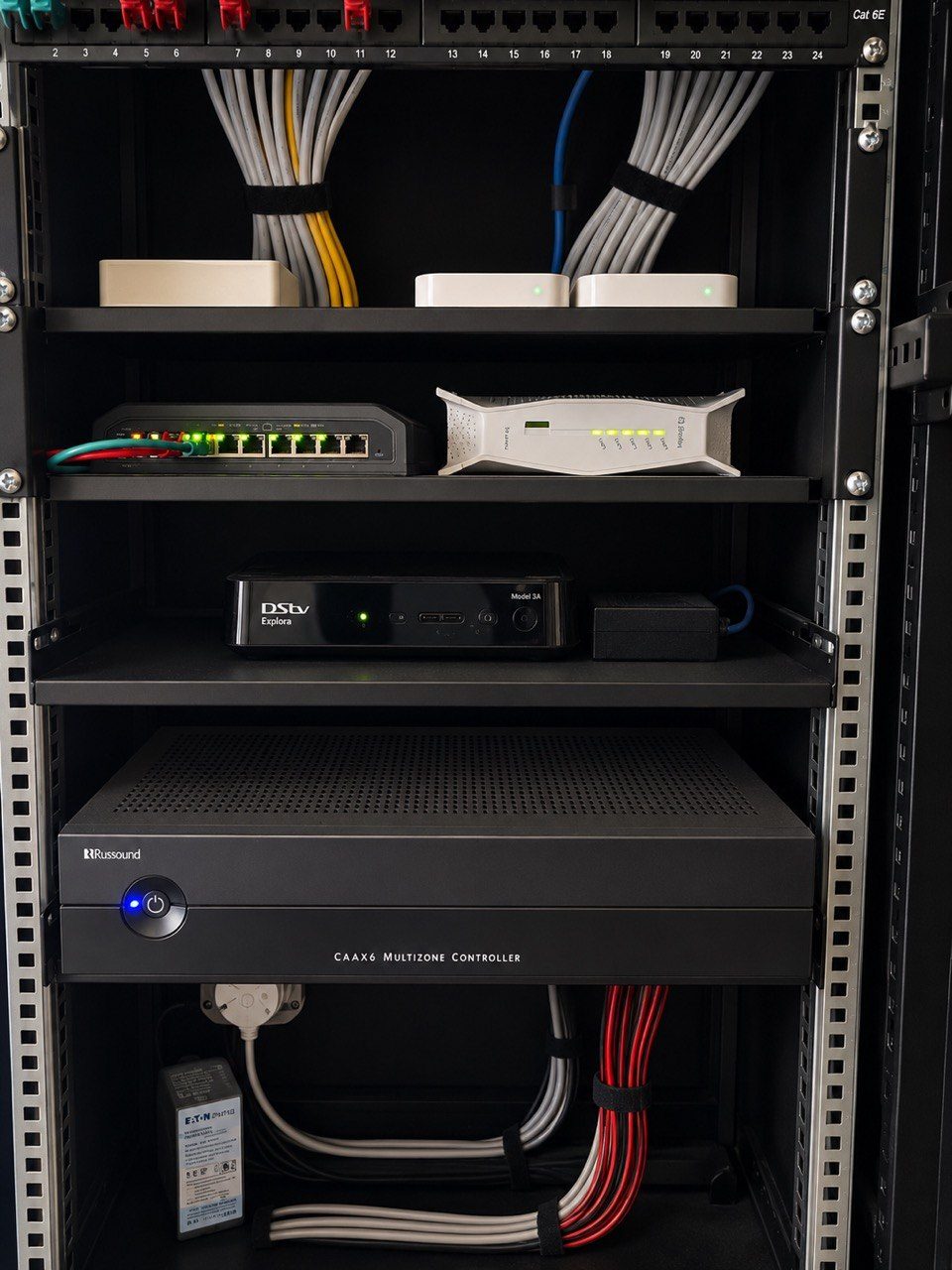
The rack or network cabinet is where the fibre handover, router, gateway, switches, patch panels, PoE, UPS, cable labels and support access come together. If that area is badly planned, the Wi-Fi will always be harder to support.
A good rack gives the network a proper home. Cables are labelled. Patch leads are logical. Switches have enough ports and PoE budget. Equipment has airflow. Power is not a tangle of loose adapters. There is space for the fibre equipment, network hardware and future additions. The next technician can understand what they are looking at.
UPS power also matters. In South Africa, power quality and outages are part of real-world design. A premium Wi-Fi system should not fall over immediately because the fibre ONT, gateway or PoE switch lost power. The correct UPS design depends on the property and the load, but the principle is basic: if the network supports security, communication, cameras and control, its power path deserves proper thought.
This does not mean every home needs an oversized rack or unnecessary equipment. It means the hidden infrastructure must match the expectation placed on the visible experience.
If the owner expects stable Wi-Fi, CCTV access, streaming audio and smart-home control, the rack cannot be an afterthought.
Cheap extenders usually solve the wrong problem
There is a place for simple consumer Wi-Fi products. A small flat, cottage or temporary setup may not need a professional network.
The mistake is using the same thinking in a premium estate home.
Cheap extenders are attractive because they look like a quick fix. Buy a box, plug it in, see more bars. The problem is that the original issue often remains underneath.
The access point may still be in the wrong place. The router may still be overloaded. The extender may be using weak wireless backhaul. Devices may still roam badly. The guest network may still be mixed with the family and smart-home network. CCTV may still be fighting for bandwidth. The rack may still be undocumented. Outdoor areas may still be relying on signal leakage through glass and concrete.
In other words, the extender improves the symptom display, not necessarily the system.
That is why DG Technologies is careful about recommending quick fixes. Sometimes a small adjustment is enough. Sometimes one extra wired access point solves the real issue. Sometimes the property needs a proper network redesign. The right answer depends on inspection, not guesswork.
UniFi-style design without the sales pitch
We often use UniFi-style managed networking for premium homes because it suits the type of work we do: multiple access points, PoE switching, central management, guest networks, VLANs, remote support and a clear view of the network.
But the brand is not magic.
A UniFi access point installed in the wrong location, with poor cabling and careless configuration, can still disappoint. A professional system only becomes professional when the design, installation and support process are professional.
The judgement matters:
- where each access point should go
- which devices should be wired instead of wireless
- how many switch ports and how much PoE capacity are needed
- where the rack should be located
- what should sit on guest, family, CCTV and automation networks
- how outdoor coverage should be handled
- how the system will be labelled and documented
- how support will happen after handover
That is the work the client is really paying for.
The equipment enables the outcome. It does not replace the design.
Premium Wi-Fi should be supportable years later
A good network should not become a mystery after the installer leaves.
For DG Technologies, supportability is part of the design brief. That means labelled cables, sensible rack layout, documented network names, known device roles, remote access where appropriate, and a system that another competent technician can understand if work is needed later.
This matters in KZN estate homes because these properties often change over time. A new office is added. A bedroom becomes a media room. More CCTV cameras are installed. A holiday home gets used differently by family and guests. A renovation changes ceiling access. A fibre provider replaces equipment. A new owner inherits the system.
If the original network was designed properly, those changes are manageable.
If it was built from extenders, hidden routers and unlabelled cables, every change becomes harder than it should be.
Good Wi-Fi is not only about day-one speed tests. It is about whether the home still makes sense three, five or ten years later.
What premium KZN homeowners should ask
Before accepting a Wi-Fi quote for a large home, ask practical questions.
Where will the access points be placed, and why?
Are they wired back to a central switch or rack?
Is the cabling labelled?
Is there enough PoE capacity?
Will the network support CCTV, smart-home control, audio and streaming?
Will guests have their own network?
Are VLANs or network separation required?
How will outdoor areas be covered?
What happens to the network during a power failure?
Can the system be supported after installation?
These questions quickly separate a proper network design from a signal-bar exercise.
The DG Technologies approach
For premium homes in Umhlanga, Mount Edgecombe, Zimbali, Simbithi and the wider KZN coast, DG Technologies designs Wi-Fi as infrastructure.
We look at the building, the family, the services that depend on the network and the practical support path after installation. We consider access point placement, cabling, switching, VLANs, guest access, rack layout, UPS power, CCTV, smart-home control, audio, outdoor coverage and future changes.
The goal is not to sell the most access points.
The goal is a network that feels quiet, stable and understandable.
That is what premium Wi-Fi should mean. Not more bars on a phone. A better-designed home network underneath everything the family uses every day.