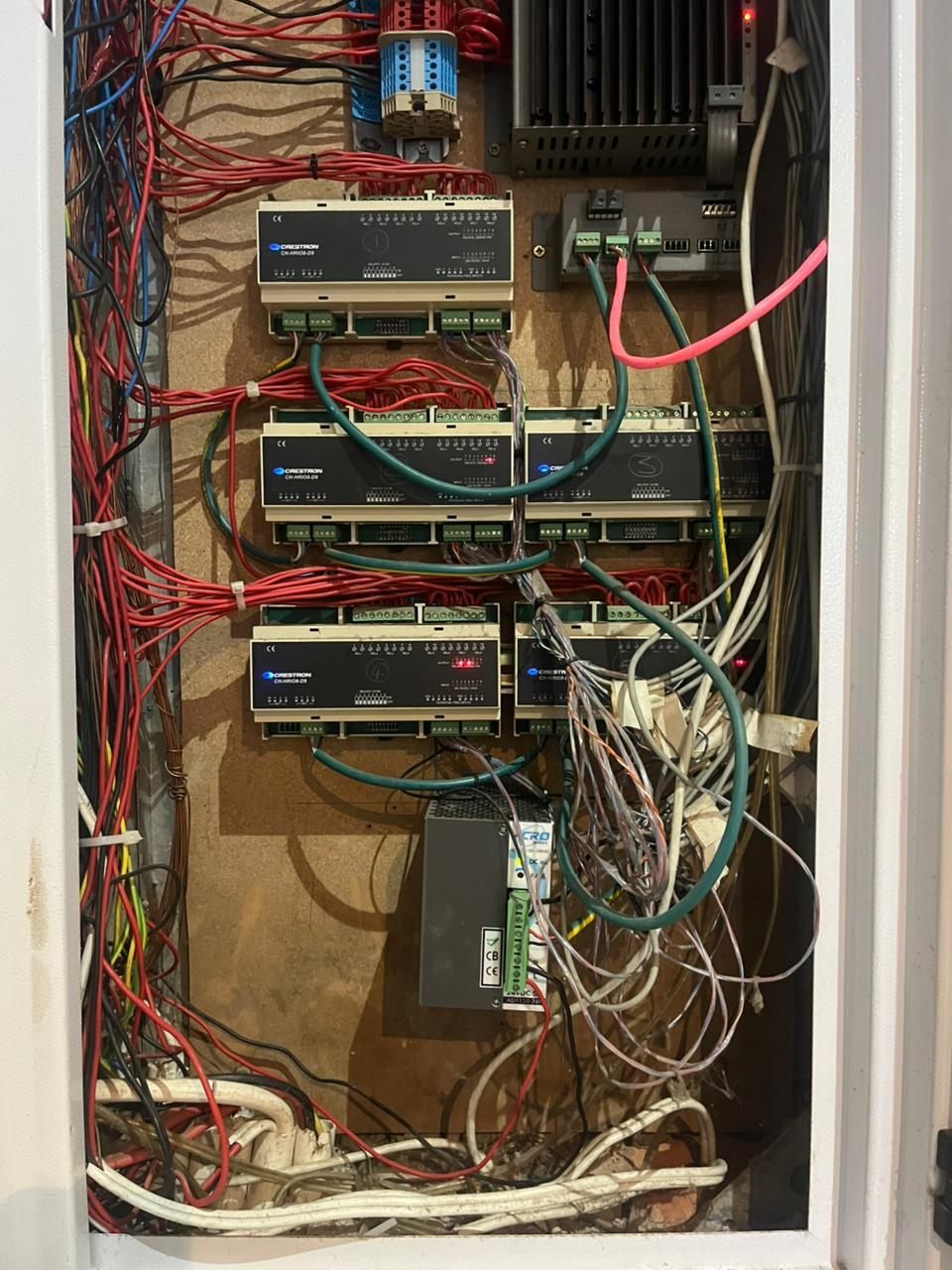
When a smart home is unreliable, the homeowner usually wants one thing first: clarity.
Why are the lights not behaving? Why is the app slow? Why do cameras drop offline? Why does music work in one room and not another? Why does Wi-Fi fail in a house with fibre? Why does the system seem to get worse after every small change?
A proper rescue report should answer those questions before the project turns into a list of replacement equipment.
DG Technologies is often asked to look at older Crestron, AV, CCTV, Wi-Fi, lighting-control and network systems where the client no longer has confidence in the installation. Sometimes the system is genuinely at the end of its useful life. Sometimes the hardware still has value, but the network, rack, documentation or programming logic needs attention.
The report should make that distinction clear.
The report should start with symptoms
A rescue report should record what the client is actually experiencing.
That may include:
- unreliable lighting scenes
- dead keypads
- slow or confusing touch panels
- Wi-Fi dead zones
- CCTV playback issues
- cameras dropping offline
- audio zones not matching rooms
- source equipment no longer working
- app access problems
- power-recovery issues after load shedding
- undocumented changes from previous contractors
Symptoms matter because they tell the technician where the system is failing from the user’s point of view.
The report should not only describe what is technically installed. It should describe why the home no longer feels reliable.
It should document what exists
Before recommending repairs, the report should identify the system as it stands.
That includes:
- control processors
- lighting modules or panels
- keypads and touch panels
- network equipment
- Wi-Fi access points
- CCTV recorder and cameras
- audio amplifiers and source devices
- HDMI or AV distribution
- rack layout
- cable labelling
- power supplies
- UPS or backup power
- gate, intercom or access-control interfaces
This inventory does not need to be a perfect engineering manual on day one, but it should give the homeowner a clear picture of what is known, what is unknown and what still needs investigation.
It should show visible risks
Photos are useful in a rescue report, especially where they show:
- messy or overloaded racks
- unlabelled cabling
- poor ventilation
- inaccessible equipment
- exposed low-voltage wiring
- unsuitable power supplies
- old network equipment
- badly placed Wi-Fi access points
- lighting modules or DB areas needing attention
The purpose is not to shame another installer. The purpose is to show why the system is difficult to support and what needs to be corrected.
Good photos help the homeowner understand issues that would otherwise remain hidden behind technical language.
It should separate faults from design debt
Not every issue is urgent.
A proper report should separate:
- immediate faults
- safety or reliability risks
- undocumented areas
- poor design decisions
- ageing equipment
- optional improvements
- future upgrade recommendations
This matters because a homeowner may not want or need to fix everything at once. The report should help them prioritise.
For example, a failing network switch may need immediate replacement. Unlabelled cables may not stop the system today, but they will increase support time later. Old amplifiers may still be worth keeping. A lighting load problem may be more urgent than replacing touch panels.
The report should make those priorities clear.
It should identify what can be kept
A rescue report should not assume replacement is the only professional answer.
Some equipment may still be useful:
- good amplifiers
- correctly placed speakers
- usable cabling
- serviceable racks
- lighting circuits that only need recommissioning
- cameras that need better network support
- touch panels or keypads that still suit the home
Keeping equipment is sensible when it does not compromise reliability, support or the client experience.
At the same time, the report should be honest where equipment has become unreliable, unsupported, insecure, underpowered or unsuitable for the current home.
It should explain recommended phases
Many rescue projects are best handled in phases.
Phase one may restore core reliability: network, rack, processor, lighting faults, CCTV recording or app access.
Phase two may tidy documentation, improve room naming, simplify user controls or clean up racks.
Phase three may upgrade older equipment, expand Wi-Fi, improve audio, replace cameras or modernise lighting control.
Phasing gives the homeowner control. It also avoids the panic of replacing everything before the real problems have been understood.
It should leave the client smarter
A good rescue report should give the homeowner confidence.
They should understand:
- what is wrong
- what is still useful
- what should be fixed first
- what can wait
- what risks exist
- what information is missing
- what a proper next step looks like
The homeowner should not feel trapped between vague technical language and a large replacement quote.
The DG Technologies approach
DG Technologies handles legacy Crestron and smart-home rescue work across Durban, Mount Edgecombe, Umhlanga, Zimbali, Simbithi and wider KZN.
Our view is simple: assess first, then repair or upgrade properly.
A rescue report is not paperwork for the sake of it. It is how a confusing system becomes understandable again.