In a large private home, the house manager often becomes the first line of technology support.
They may not install the system. They may not understand the network design. They may not know how the rack is wired. But when something does not work, they are usually the first person the owner asks.
The Wi-Fi is slow.
The gate intercom is not ringing.
The outside music is not playing.
The cinema remote is missing.
The CCTV app is not loading.
The guest room TV is on the wrong input.
The house manager does not need to become an AV technician, but they do need a simple technology checklist.
That checklist should be practical, repeatable and written in the language of the home.
Start with the systems the owner notices first
A good checklist should start with the systems that affect daily comfort and confidence.
For most premium homes, that means:
- Internet and Wi-Fi.
- CCTV and remote viewing.
- Gates and intercoms.
- Main entertainment areas.
- Outdoor audio.
- Guest bedroom TVs.
- Lighting scenes.
- Key remotes and batteries.
- Rack power and UPS status.
- Any Crestron Home or automation controls used daily.
The checklist should not include every technical detail in the system. It should focus on what the house manager can realistically check without creating risk.
If the checklist becomes too technical, it will not be used.
Wi-Fi checks should be simple
The house manager should not be expected to troubleshoot VLANs, roaming, PoE budgets or switching.
But they can check practical symptoms.
Is the internet working in the main living areas? Are the owner’s usual devices connected? Are guest networks visible? Has the fibre router been moved or unplugged? Are any access points obviously off? Did the problem start after load shedding or a service provider visit?
Those answers help the support team quickly decide whether the issue is likely ISP-related, power-related, network-related or device-specific.
For larger homes, this depends on a proper infrastructure foundation. Our premium Wi-Fi and networking guide explains why access points, cabling and rack design matter more than signal bars.
CCTV checks should happen before something goes wrong
CCTV is often ignored until footage is needed.
That is a mistake.
A house manager checklist should include basic CCTV health checks:
- Are the key cameras visible in the app or monitor?
- Is the recorder showing normal operation?
- Is the date and time correct?
- Are important camera views still clear?
- Have plants, vehicles or furniture blocked any view?
- Are exterior cameras dirty or affected by weather?
- Can remote viewing still be accessed by authorised users?
This does not replace professional maintenance, but it catches obvious problems early.
It also helps avoid the worst CCTV support call: discovering after an incident that the camera was offline.
For more detailed design thinking, see our CCTV and security planning guide.
Remotes and source control need discipline
Many entertainment faults are not faults at all.
The wrong remote is in the wrong room. A decoder was switched off. A TV is on the wrong input. A battery is flat. A guest moved a streaming device. A staff member unplugged a power supply while cleaning.
A house manager checklist should include:
- Are room remotes in the correct places?
- Do important remotes have working batteries?
- Are guest TV instructions still accurate?
- Are source labels still understandable?
- Are owner-only remotes kept separate from guest areas?
This links directly to why source labels and remote-control handover matter.
Rack checks should avoid unnecessary touching
The rack is important, but it should not be handled casually.
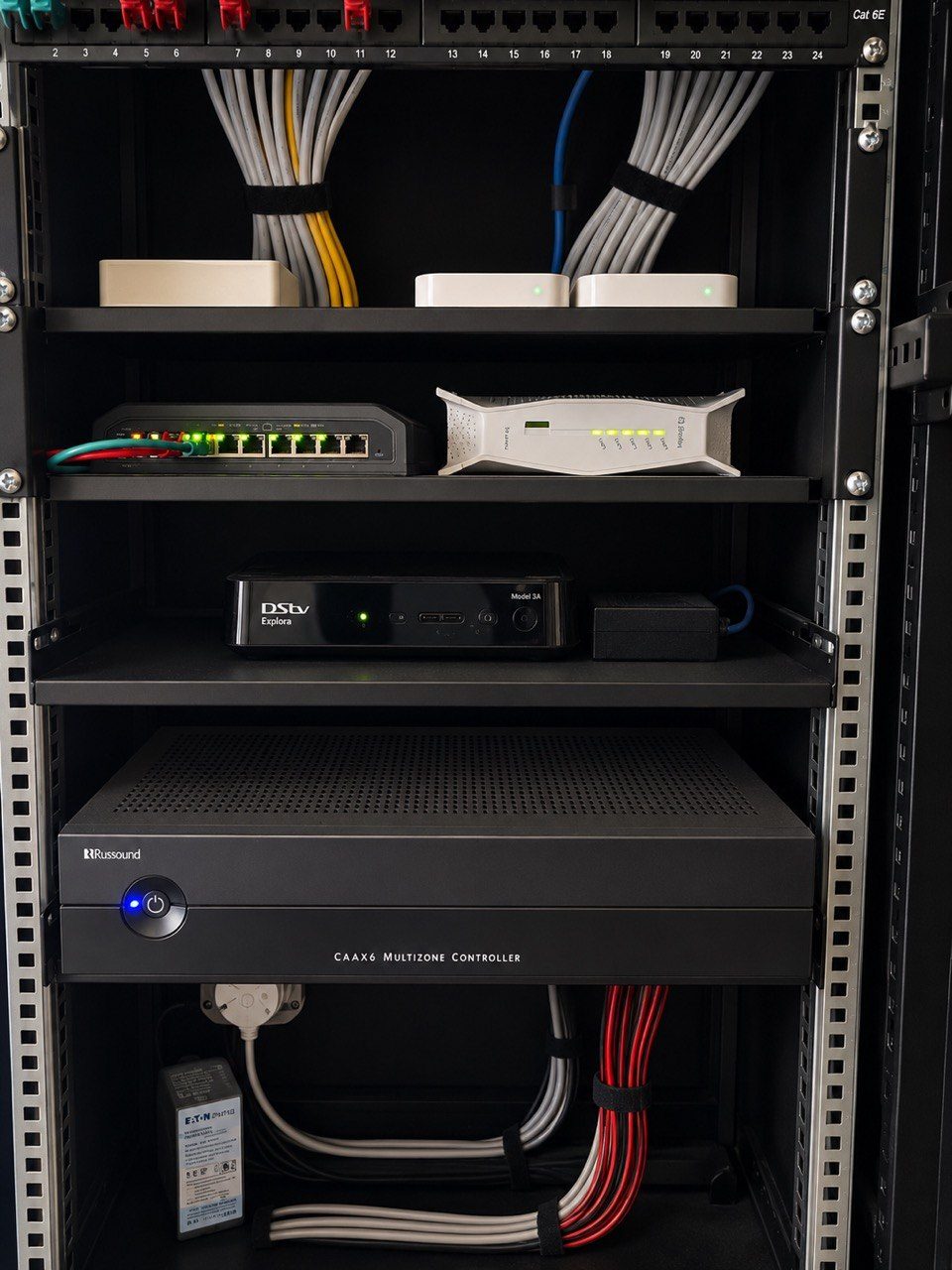
The checklist should not tell a house manager to unplug equipment or move cables unless there is a very specific agreed process. Instead, it should focus on safe observations.
For example:
- Is the rack powered?
- Is the UPS showing an alarm?
- Are any devices obviously off?
- Is the rack cupboard blocked?
- Is ventilation clear?
- Has anyone added, removed or moved equipment?
- Does the rack look different from the handover photo?
This is where rack photos at handover become useful. They give the house manager and support team a baseline.
Good fault reports save time
The checklist should also explain how to report a problem.
A vague message like “the TV is not working” can mean many things.
A useful report says:
- Which room?
- Which source?
- What button was pressed?
- What appeared on screen?
- Is there sound?
- Did it work recently?
- Did anything change?
- Can you send a photo or short video?
That information can turn a long support investigation into a focused response.
We have written separately about why photos and videos help diagnose AV faults faster.
The checklist should be part of handover
A house manager checklist should not be created after the first frustration.
It should be part of the handover process for large homes.
The owner, house manager and support team should agree:
- what the house manager can check,
- what should be escalated,
- who is allowed to access which systems,
- what should never be unplugged,
- how remote support is requested,
- and how changes are documented.
This protects everyone.
The owner gets fewer interruptions. The house manager has a clearer role. The support team receives better information. The technology stays more stable.
For serious private homes, that is not overkill.
It is how a professional home automation and support relationship should work.