When something stops working, the first instinct is usually to say, “It’s not working.”
That is understandable.
But for AV, CCTV, Wi-Fi and smart-home systems, those three words can mean many different things.
The TV may have no picture. The amplifier may be on the wrong input. The decoder may be off. The app may not connect. A camera may be offline. The Wi-Fi may be weak in one room. The projector may show a blue screen. A touchscreen may respond slowly. A gate camera may work locally but not remotely.
Those are different problems.
They need different responses.
This is why photos and short videos are often one of the fastest ways to diagnose an AV fault before sending a technician.
A photo shows context that words miss
A client may describe a fault accurately from their point of view, but still miss the technical clue.
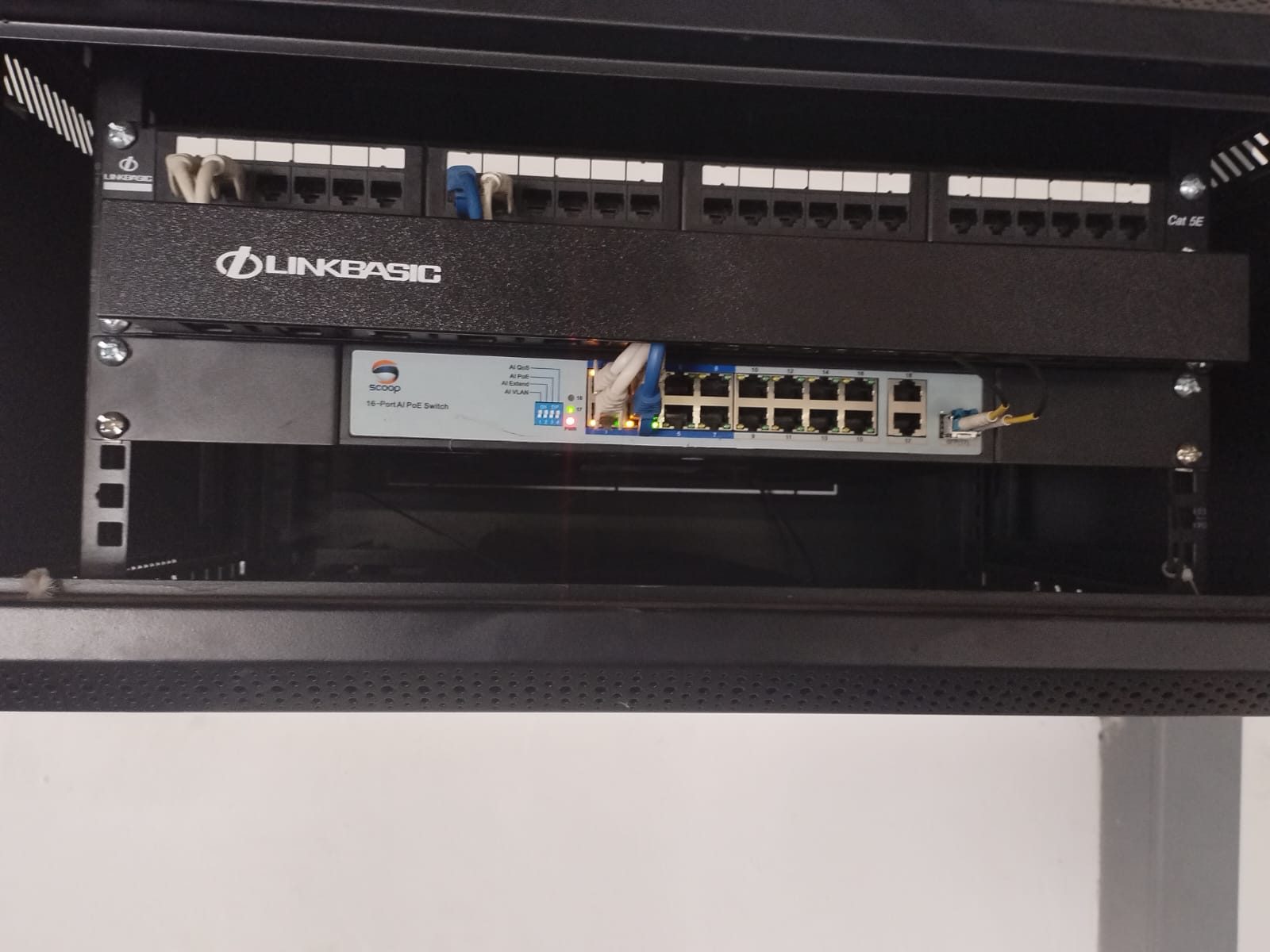
A photo of the rack may show a powered-off device, a warning light, a disconnected HDMI cable, a switched-off plug, a network switch with no PoE lights or a decoder displaying an error.
A photo of the TV screen may show whether the problem is:
- no signal,
- wrong input,
- decoder error,
- HDMI handshake,
- network streaming issue,
- app login issue,
- or a source that is simply off.
That does not mean the client must become the technician. It means the support team can start with better information.
In many cases, one clear photo saves several phone calls.
A short video can show behaviour over time
Some faults are not static.
The picture appears, then drops. The sound works, then cuts out. The remote works in one direction but not another. The app opens, then fails. A projector starts up, then shuts down. A camera image freezes. A Wi-Fi device connects, then disconnects.
A short video can capture that behaviour.
For AV and automation support, motion and timing matter. Seeing the exact sequence helps separate a control issue from a source issue, a power issue from a signal issue, or a user-interface issue from a system fault.
For example, if a client sends a short video showing the button they pressed, the screen response and the equipment state, the support team can often narrow the problem before arriving.
That makes the site visit more effective.
Good support asks specific questions
The goal is not to ask the client for random photos.
The goal is to ask for the right evidence.
For a TV or cinema fault, useful support questions may include:
- What room is affected?
- Which source are you trying to watch?
- Is the TV or projector on?
- What message is on the screen?
- Can you send a photo of the remote or app screen?
- Can you send a photo of the rack lights?
For CCTV, the questions may be different:
- Is live view working?
- Is playback working?
- Is only one camera offline or all cameras?
- Is the NVR powered?
- Is remote viewing failing only away from home?
- Can you send a screenshot of the app error?
For Wi-Fi, the useful evidence may be the room, device, signal behaviour, access point lights and whether wired devices still work.
This is why smart-home support is partly technical and partly communication. The better the first conversation, the better the outcome.
Photos help avoid unnecessary call-outs
Not every support issue needs a technician immediately.
Sometimes the issue is a source left off, a tripped plug, a decoder error, a missing remote battery, a known service outage, an app setting, or a device that needs a controlled restart.
If a photo or video confirms that, the client can often be guided without waiting for a site visit.
That does not mean every fault can be solved remotely. Serious issues still need proper investigation. Damaged cabling, failed hardware, HDMI distribution problems, network faults, lightning damage, water ingress, poor terminations and rack faults may all require hands-on work.
But even then, photos help.
They allow the technician to arrive with the right tools, likely replacement parts and a clearer plan.
The rack photo is often the most useful one
In a premium home, many visible symptoms start in the rack.
The rack may contain the router, switch, fibre equipment, automation processor, CCTV recorder, AV matrix, amplifiers, decoders, streaming devices, UPS and power distribution.
If one of those devices is off, locked up, unplugged or showing a warning state, the room may appear faulty even though the screen, speaker or camera is fine.
This is one reason DG Technologies cares so much about rack design. A clean, labelled rack makes support easier. A messy rack makes every photo harder to interpret.
When the rack is neat, a photo can tell a story quickly.
Support should reduce guesswork
Good fault finding is not guessing faster.
It is removing uncertainty step by step.
Photos, videos, screenshots and clear descriptions help do that. They give the support team a starting point. They help decide whether the issue is urgent, remote-supportable, equipment-related or user-interface related. They also reduce the chance of sending someone to site without enough information.
For the client, the benefit is simple: faster answers and fewer frustrating repeat explanations.
For the technician, the benefit is also simple: arrive prepared.
In AV and smart-home support, that practical discipline matters. The best support call is not always the longest one. It is the one that gets to the real fault cleanly.