A CCTV system should not begin with someone arriving on site and asking, “Where do you want the cameras?”
That question sounds practical, but it often leads to poor results. Cameras end up where cabling is easiest, where the wall looks convenient, or where the client feels nervous on the day. The system may look complete on handover, but when something actually happens, the footage may not show the detail that matters.
Proper CCTV design starts before installation.
It starts with a plan: what each camera must see, what it must prove, how the cable will get there, where recording equipment will live, how the homeowner will review footage, and how the system can be expanded later without starting again.
That is the difference between installing cameras and designing a security system.
DG Technologies approaches CCTV installation as part of the wider property infrastructure. The camera is only the visible end point. The real reliability sits in the design behind it.
Start with the purpose of each camera
Every camera should have a job.
Some cameras are for awareness. They show that somebody moved through a garden, driveway or entertainment area. These cameras can often use a wider lens because the goal is broad coverage.
Some cameras are for identification. They need to show a face, vehicle, gate event or specific access point clearly enough to be useful. These cameras usually need tighter positioning, better lens choice and more careful height.
Some cameras are for evidence. They need to record a route, an entrance, a handover area or a repeated risk point. For these views, “I can see something moving” is not enough. The system must capture the right detail at the right distance.
Before choosing brands or models, decide what each view must achieve:
- identify a person at the pedestrian gate
- see a vehicle entering the driveway
- monitor a garage door
- cover a side passage
- watch the pool or patio
- record movement at a staff entrance
- confirm activity near a boundary wall
- support an intercom or access-control event
Once the purpose is clear, camera placement becomes much more logical.
Viewing angles should be planned, not guessed
A camera lens is a design decision.
A 2.8mm lens gives a wide view and is useful for general coverage. A 4mm or 6mm lens narrows the view and can be better for longer driveways, gates or identification points. Wider is not automatically better. A very wide image may look impressive, but the useful detail can disappear quickly as the subject moves away from the camera.
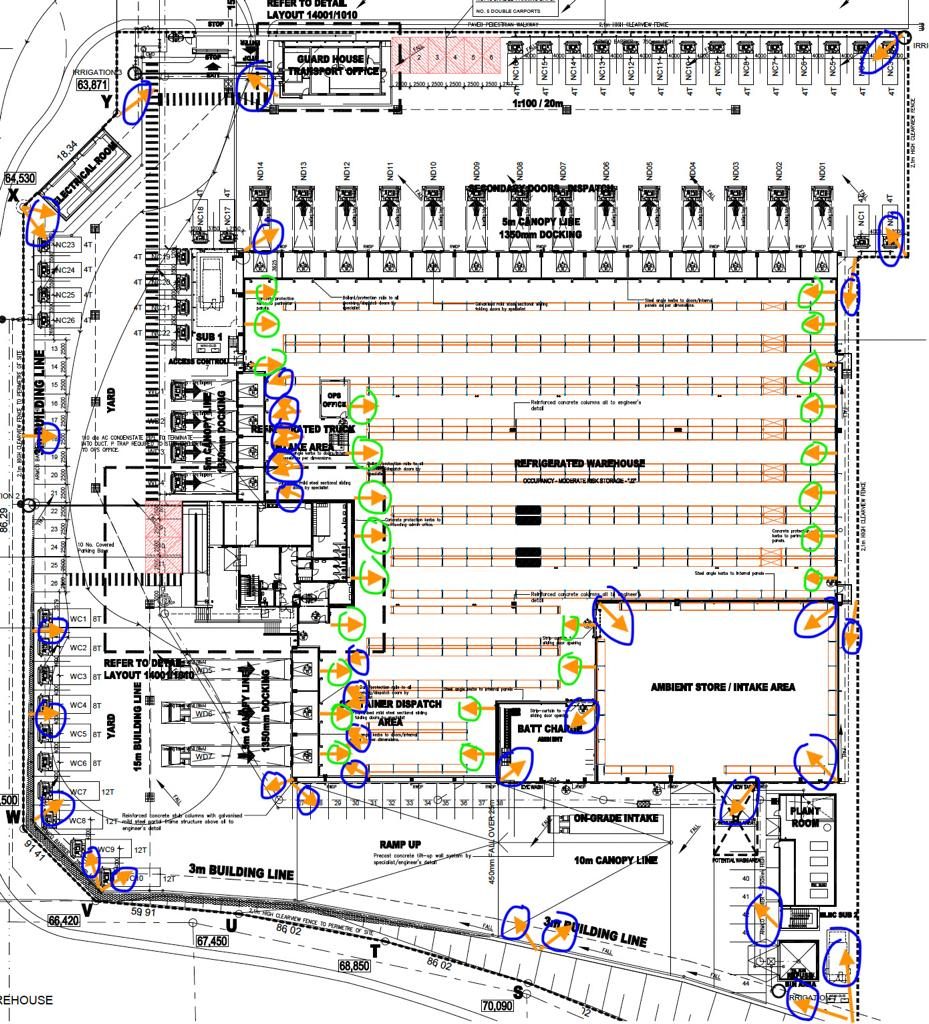
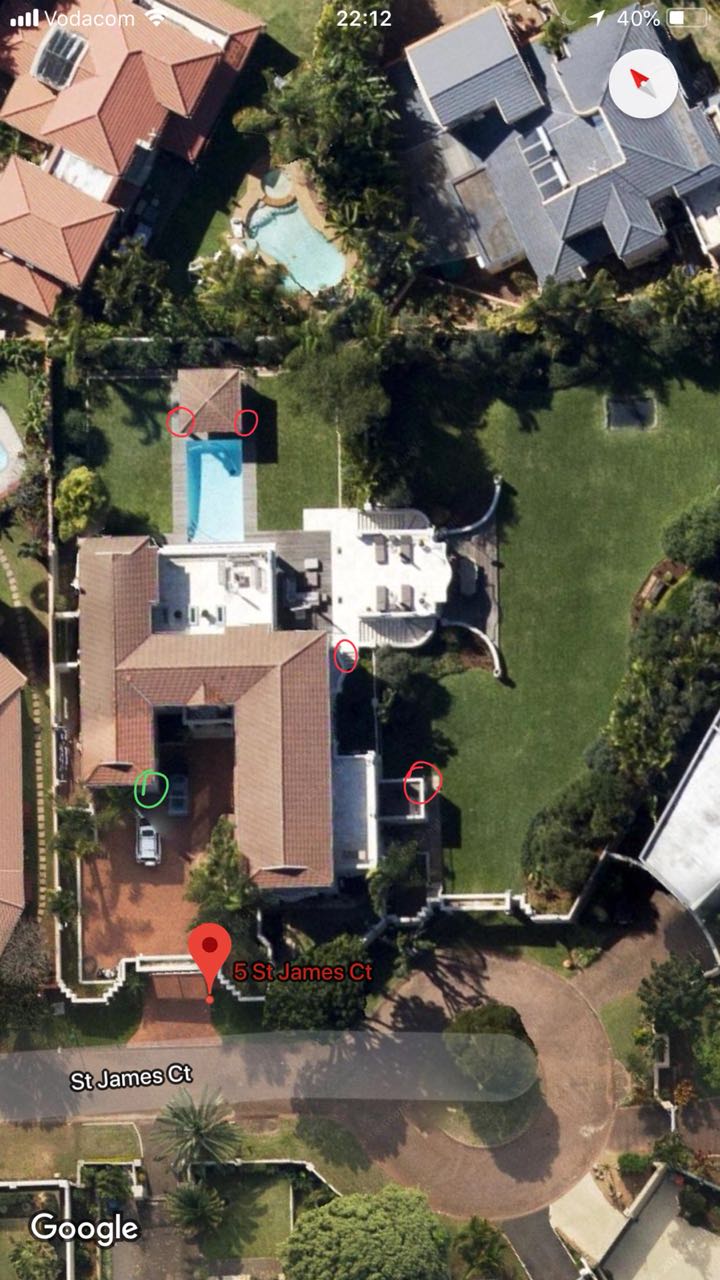
On larger properties, DG Technologies prefers to think in terms of estimated viewing angles before installation. On a drawing or plan, you can see whether the camera is covering the intended zone, whether there are blind spots, and whether two cameras are duplicating the same view unnecessarily.
This avoids one of the most common CCTV mistakes: installing cameras first and discovering later that the footage does not answer the question the client actually needed answered.
Cabling decides more than people realise
CCTV cabling is not glamorous, but it can make or break the project.
If there are not enough usable cables, the installer has to run new cable. If the existing cable is in the wrong place, the camera may end up compromised. If there is no conduit path, the work becomes more invasive and more expensive. If exposed routes are chosen too casually, the installation can damage the look of the property.
This is especially important during renovations and new builds. A small decision early in the project can save a lot of frustration later.
For example, using an existing cable may sound cheaper until it turns out that the cable count, route or quality is not suitable for the CCTV system. At that point, the correct answer may be new cabling, new conduit, proper junction boxes and clean terminations. That is not upselling. It is making the system serviceable and reliable.
Good CCTV planning should ask:
- how many camera cables are needed
- whether each route is accessible
- whether conduit is large enough
- where junction boxes should be placed
- how exposed cabling will be avoided
- whether spare capacity should be allowed
- whether the route supports future cameras
The best time to answer those questions is before ceilings are closed, paving is complete, walls are finished or landscaping is final.
Central recording location matters
The recorder should not be an afterthought.
Whether the system uses a DVR, NVR or server-based recording, its location affects cabling, power, ventilation, internet access, remote support and maintenance. Placing it in the wrong cupboard can make the whole system harder to support.
A central location can reduce cable runs and make future expansion easier. It can also simplify UPS backup, network switching, PoE power and fault finding. In larger properties, especially estate homes or sectional layouts, this becomes an important design choice.
The recorder location should be chosen with the rest of the infrastructure in mind:
- network rack or equipment cabinet
- available power
- ventilation
- access for servicing
- cable routes from cameras
- connection to the internet
- backup power requirements
- security of the equipment location
If the recorder is hidden somewhere inconvenient, every future service call becomes harder than it needed to be.
CCTV is part of the network
Modern CCTV systems are usually IP-based, which means cameras, recorders, apps and remote viewing all depend on the network.
That network needs to support camera traffic without making the rest of the home unreliable. It also needs enough switching capacity, proper PoE power, sensible rack layout and stable internet access for remote viewing.
If the homeowner expects to check cameras from a phone, review footage remotely or receive alerts, the CCTV system cannot be designed separately from the network infrastructure. Weak Wi-Fi, poor switching or messy cabling can make a good camera system feel poor.
This is why we often discuss CCTV, access control, Wi-Fi and smart-home control together. In a modern property, they are connected systems.
Plan for future cameras
Not every camera has to be installed on day one.
Sometimes the budget, construction stage or immediate risk profile means the client starts with a smaller system. That is fine, provided the design does not block future expansion.
Future planning may include:
- spare conduit runs
- larger conduit where practical
- extra rack space
- spare switch ports
- PoE capacity
- junction locations
- cable routes to likely future camera positions
- recording capacity that can scale
This is where good judgement saves money. You do not need to buy every camera immediately, but you should avoid choices that make future cameras unnecessarily expensive.
What a proper CCTV design should include
Before installation begins, a professional CCTV design should be able to explain:
- the purpose of each camera
- the approximate field of view
- the lens choice
- the mounting position
- the cable route
- the recorder or NVR location
- how footage will be reviewed
- how remote viewing will work
- how the system connects to the network
- what future expansion is allowed for
If a quote only lists camera quantities and prices, it may be missing the most important part of the system: the thinking.
The DG Technologies approach
DG Technologies designs CCTV systems for homes, estates, hospitality and commercial properties across Durban and KwaZulu-Natal. Our focus is not simply placing cameras on walls. It is making sure the client gets useful footage, clean installation, reliable recording and a system that can be serviced later.
That means asking practical questions before the work starts. Where should the camera go? What must it prove? How will the cable get there? Can we maintain it later? Will the recorder be protected? Will remote viewing be reliable? Can the system grow?
Those decisions are what make CCTV valuable when it matters.
If you are planning a new build, renovation or CCTV upgrade, start with the design. Speak to DG Technologies about CCTV and security systems, network infrastructure, or request a site review through the quote page.